Showing posts with label Informational. Show all posts

Friday, May 19, 2017

Texture in Web Design

Texture is normally looked at as a grungy kind of style but it actually is very useful when used correctly. It has many uses that can add visual appeal to something.

You can visit Smashing Magazine for an in-depth tutorial on texture.

A. Texture can be overlooked because it can be thought of as a dirty design. It actually can bring a whole design together but should not be the focus.

B. Patterns are usually smaller images that repeat over and over. Texture are usually larger images that do not repeat.

C. You can use a textured object against a clean background or a clean object against a textured background.

D. Texture can catch your eye and lure it toward the textured area.

E. It can add to personal or unique aspects about your sites.

F.

  1. You need to make sure that if you are using textures that you make sure everything is still easy to read.
  2.  Do not use too much texture to the point that it is distracting.
  3. Practice using texture before you apply it to a real project.
  4. If you don't need to use texture don't.
  5. Think about how you will use texture before you start.
  6. Whenever you come across something you can use; save it immediately so you don't have to find it later.
  7. Masks are a safe and efficient way to apply texture.
  8. Make sure your textures are high quality instead of worrying about loading time.
  9. Use textures that make sense for the topic.
4.
Maptia

Old Town Spice

The Kettle

Uinta Brewing

Thursday, May 18, 2017

ColorHexa Chrome Extension

What Is It?

This extension is called ColorHexa. It allows to to find or input a color code and find out all sorts of information on that color. One great thing is that it will also show color schemes for that color you choose. It even has the color conversions for about any kind of code. This extension would be best used by designers or anyone who is using many colors or trying to make a color scheme using a certain color.

How To Use:

To use this extension you first click the extension then enter your color code or search for a color with the + button. After you do that it will pull up a page with a ton of information on the color you chose.

Extension
Search Bar

Color Information

Schemes. Alternatives, etc.

Conclusion:

I think that this extension is very easy to use. The hardest part is probably coming up with the code for the color you want or even having to decide on a color. The sheer amount of information you get is a little overwhelming but it has so much useful information its hard to say its a bad extension. I would overall say that it is a great extension that provides information that you may not of even known you needed. It would be a great thing for anyone that has need of finding things like color schemes and alternate colors.

You can download the ColorHexa extension for Google Chrome here

Font Finder Chrome Extension

What Is It?

This extension is called "Font Finder". It allows you to select an element on a page and it will show you the CSS for it. So not only do you get get the font but also any other CSS that is associated with it. This would most likely be most useful for a web designer to be able to see CSS on an element of the page in a clean looking window.

How To Use:

Using Font Finder is very simple. You Simply click the extension then click the element on which you want to see the CSS for. A window should then pop up with the CSS for the element you selected.
Extension

Element


Font Finder Window

Conclusion:

This extension is extremely easy to use. It may be very simple but just using for something like finding the font of a word it is fast and works well. I think that if this is something that sounds like something someone could use then they should definitely try it.

You can download the Font Finder extension for Google Chrome here

Monday, January 9, 2017

Flash

Flash allowed webpages to have more complex animations to the site and it also allowed the implication of video and flash games. It also allowed for everything in it to be the same for everyone instead of it possibly being different. Although flash was huge for sometime it declined in popularity when it was not implemented in the new iPhone. Steve Jobs believed that the new HTML 5 would replace flash and be better overall due to browsers being able to build on it. However since HTML 5 was not as develop yet flash still ran many popular sites like youtube videos or facebook games. In 2011 Edge Animate was released by Adobe to create HTML 5 for mobile devices. Adobe admitted that HTML 5 was better for mobile devices instead of flash. In 2015 Youtube made its default
video player HTML 5 and Adobe's flash player allowed hackers to put surveillance software onto
computers. Adobe discontinued Edge Animate and made Animate CC. Animate CC allowed HTML

5 and Flash to be developed. Facebook is still using flash for its games but there is very few parts of the web that still use flash. Google announced that their browser Google Chrome would block flash by default but will still be able to turn it on. Flash is definitely dying but it is something that should not be forgotten. It was a large part of the webs history and without it the web would not be what it is today. There are many archivists trying too keep flash in archived sites.

Wednesday, October 12, 2016

Melody Post


How often do you visit your family?

Usually stays at a friends house when staying in town.

How many hours on athletics/other activities?

Has practice every day for several hours.

How did you pay for college?

Got a scholarship for sports.

Advice to do well?

Do homework, study, don't drink on Sundays.


What are dorms like?

Has a roommate, her dorms has boys and girls, has different events and things in dorms.

Monday, September 12, 2016

Professional Article Review

The main point of this book was that everything you see was basically all "stolen". Everyone gets their ideas from someone else wether they know it or not. The author believes that nothing is an original work and that everything has been done before. The author uses quotes from famous artists basically saying they "stole" the ideas for their art. The author does a good job of having a strong argument for what they are saying but they kind of fall off when you look at their evidence. I think that the book did a good job at getting the main points across to the target audience. Overall I thought that the book got the authors points across well and it is useful to anyone that makes some kind of art.

Monday, August 22, 2016

New Feature in CC

Photoshop Has Artboards


A new feature in Photoshop CC is the addition of artboards. Artboards have been in Illustrator but are new to photoshop. They allow the user to view everything they have created without having to open new files or messing with layers.

You can start your new document as an artboard template. You can also use the new artboard tool to create more artboards. When you have an artboard selected, at the top you can see the different template choices or change the size of the artboard. Or you can manually adjust it by using the plus signs when the artboard is selected.

Wednesday, September 30, 2015

Orthogonal Pattern Tutorial

1
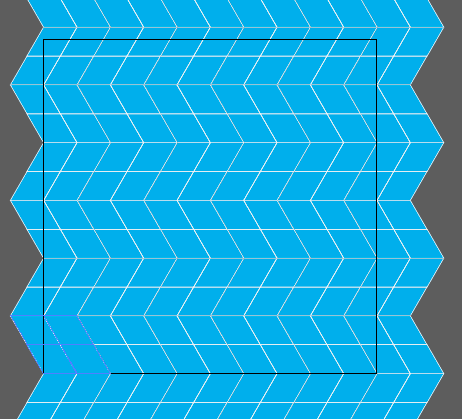
Making an orthogonal pattern is pretty easy just follow these steps.

1. First off we are going to make a 50 pt line.


2. Next get the Rotate Tool and Option click an end anchor point on your line and set the angle value to -120 and press copy take notice of the height of this new line, mine is 43.301 this will be important for later .
2


3. Now option drag the lines until you have something that looks like picture 3

3

4
4. Group That and option drag that until you make a shape like in picture number 4 group that and drag the whole shape to the bottom left of the art board.


5. Now go to the appearance panel and add a new fill to the group and set whatever color and stroke you want.


Add New Fill


6. Now with the group selected go to effect > transform and change the horizontal move to 100 pt and set the copy to whatever fills the rest of your art board horizontally


7.Now with the group selected select the reflect tool and option click the group and do a horizontal reflection and copy it.


8. Now select both groups and transform it again but this time vertically and whatever the height of your line was before put that in but make it negative and multiply it by 4. Once again make the copies whatever fills your art board vertically and there is your orthogonal pattern.